ChatCustomization Documentation
A comprehensive chat customization system for Hytale servers. Let players personalize their chat appearance with prefixes, suffixes, nicknames, pronouns, colors, gradients, and rainbow effects.
Features
- Custom Prefixes & Suffixes - Players can set custom tags before/after their name
- Nicknames - Display a custom name instead of username
- Pronouns - Show pronouns in chat (e.g., he/him, she/her, they/them)
- Color Customization - Set colors for name, message, prefix, suffix, and pronouns
- Text Styles - Bold, italic, and underline formatting
- Gradients - Two-color gradient effects on any text element
- Rainbow Text - Animated rainbow colors on any element
- Chat Editor GUI - Visual editor for easy customization
- Preset System - Admin-defined presets for consistent styling
- Permission-Based - Fine-grained control over who can use what features
Installation
- Download the latest ChatCustomization JAR file
- Place the JAR in your server's
pluginsfolder - Restart your server
- Configuration files will be generated automatically
On first run, all features are enabled by default. Use the config to restrict features or require permissions.
Quick Start
Once installed, players can immediately customize their chat. Here are the most common commands:
Text Customization
Commands for customizing text content in your chat messages.
| Command | Description |
|---|---|
/prefix <text> |
Set your chat prefix (shown before name) |
/suffix <text> |
Set your chat suffix (shown after name) |
/nickname <name> |
Set a custom display name |
/pronouns <pronouns> |
Set your pronouns (e.g., he/him, she/her) |
/resetformat |
Reset all customizations to default |
/chatprofile |
View your current chat profile settings |
For text with spaces, use quotes: /prefix "My Cool Tag"
Color Commands
Set colors for different parts of your chat message.
| Command | Description |
|---|---|
/namecolor <color> |
Set your name color |
/msgcolor <color> |
Set your message color |
/prefixcolor <color> |
Set your prefix color |
/suffixcolor <color> |
Set your suffix color |
/pronounscolor <color> |
Set your pronouns color |
/colors |
List all available color names |
Color Formats
- Hex codes:
#FF0000,#00FF00,#0000FF - Named colors: RED, BLUE, GREEN, YELLOW, GOLD, AQUA, etc.
Style Commands
Apply text styles, gradients, and rainbow effects to any chat element.
Text Styles
Examples:
/style name bold on- Make your name bold/style message italic- Toggle italics on messages/style prefix underline off- Remove underline from prefix
Gradients
Examples:
/gradient name #FF0000 #0000FF- Red to blue gradient on name/gradient message GOLD YELLOW- Gold to yellow gradient on messages/gradient name clear- Remove gradient from name
Rainbow
Examples:
/rainbow name on- Enable rainbow on your name/rainbow message- Toggle rainbow on messages
Chat Editor GUI
The visual chat editor provides an easy way to customize all aspects of your chat appearance.
Editor Features
- Set prefix, suffix, nickname, and pronouns with text inputs
- Pick colors using a visual color picker
- Toggle bold, italic, and underline styles
- Configure gradients with start/end color selection
- Enable/disable rainbow effect
- Live preview of your chat appearance
Preset System
Admins can create preset configurations that players can quickly apply to their chat. There are four types of presets:
- Style Presets - Complete chat profiles with all settings
- Prefix Presets - Just prefix text and styling
- Pronoun Presets - Just pronouns and styling
- Message Presets - Just message text styling
Each preset requires a permission to use. Players can only see and apply presets they have permission for.
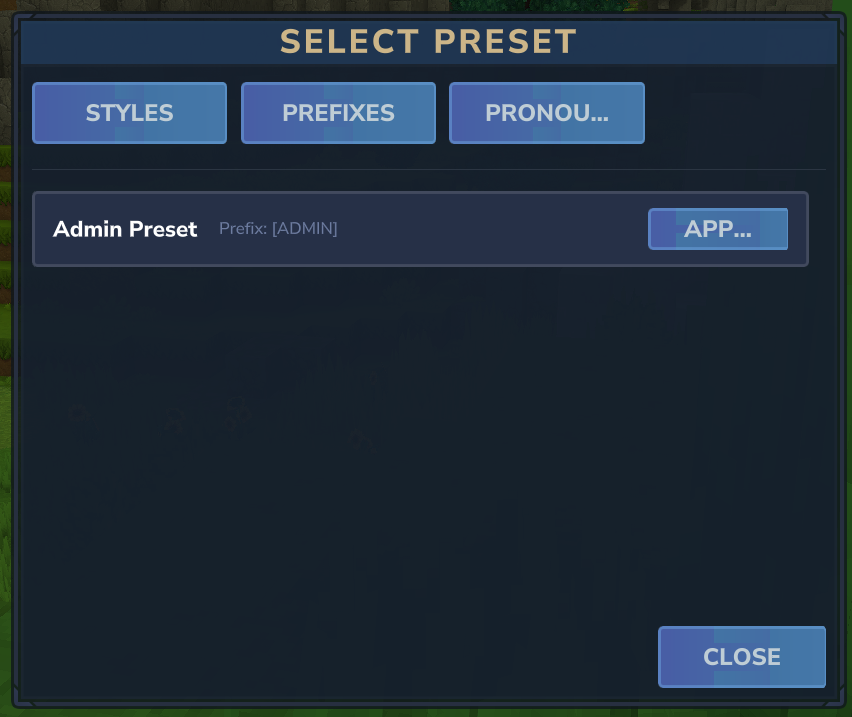
Players can browse and apply presets they have permission for
Style Presets
Style presets are complete chat profiles that include all customization options.
What's Included
- Prefix, suffix, nickname, and pronouns text
- Colors for all elements
- Bold, italic, underline styles for all elements
- Gradient and rainbow settings for all elements
Permission Format
chatcustom.preset.style.<preset_id>
Prefix Presets
Prefix presets contain only the prefix text and its styling. Useful for rank tags or titles.
What's Included
- Prefix text
- Prefix color
- Prefix styles (bold, italic, underline)
- Prefix gradient/rainbow settings
Permission Format
chatcustom.preset.prefix.<preset_id>
Pronoun Presets
Pronoun presets contain predefined pronouns with optional styling.
What's Included
- Pronouns text
- Pronouns color
- Pronouns styles (bold, italic, underline)
Permission Format
chatcustom.preset.pronoun.<preset_id>
Message Presets
Message presets define styling for player chat messages only.
What's Included
- Message color
- Message styles (bold, italic, underline)
Permission Format
chatcustom.preset.message.<preset_id>
Using Presets (Players)
Players can browse and apply presets they have permission for.
The preset selector shows all available presets organized by type (Style, Prefix, Pronoun, Message). Click on any preset to apply it to your chat profile.
You'll only see presets you have permission for. Ask an admin to grant you access to additional presets.
Admin Commands
Administrative commands for managing ChatCustomization.
You can use /cc preset and /cc reload as shorthands.
Preset Management
Admins can create, edit, and delete presets using the in-game UI.
Preset List UI
The preset list shows all configured presets organized by type (Style, Prefix, Pronoun, Message). From here you can:
- Switch between preset types using the tabs
- View all existing presets with their IDs and permissions
- Create new presets
- Edit existing presets
- Delete presets (click delete once to confirm)
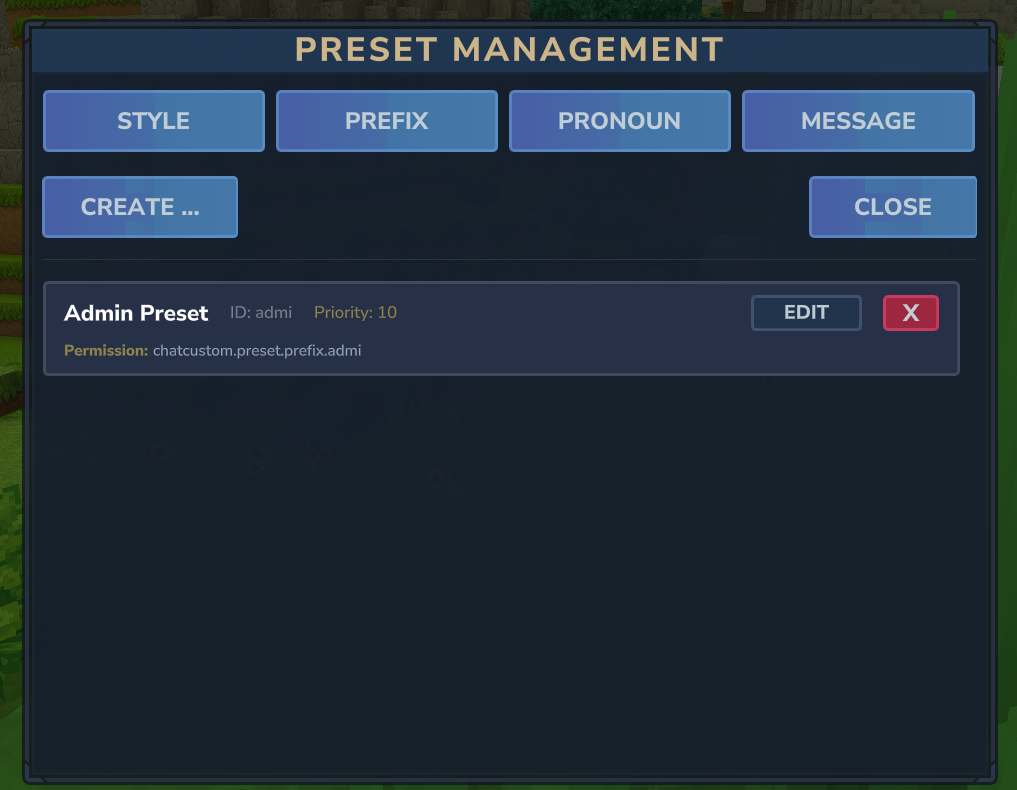
The preset management interface with tabs for each preset type
Preset Editor UI
The preset editor allows you to configure all aspects of a preset.
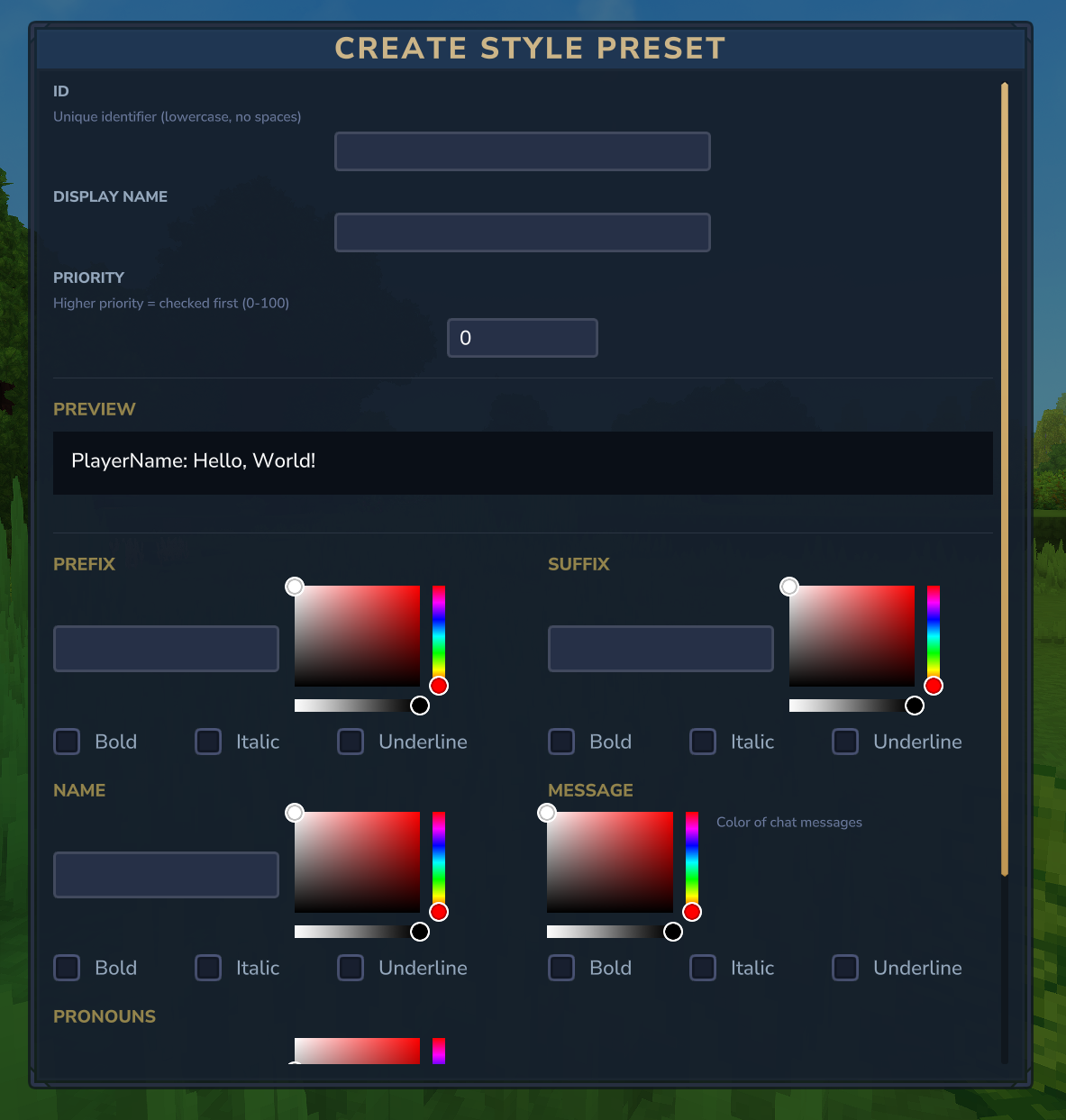
Creating a new style preset with full customization options
Style Preset Editor
Full preset with all customization options:
- ID - Unique identifier (used in permission, cannot be changed after creation)
- Display Name - Human-readable name shown to players
- Priority - Higher priority presets shown first (0-100)
- Prefix/Suffix/Nickname/Pronouns - Text values
- Styles - Color picker and bold/italic/underline for each element
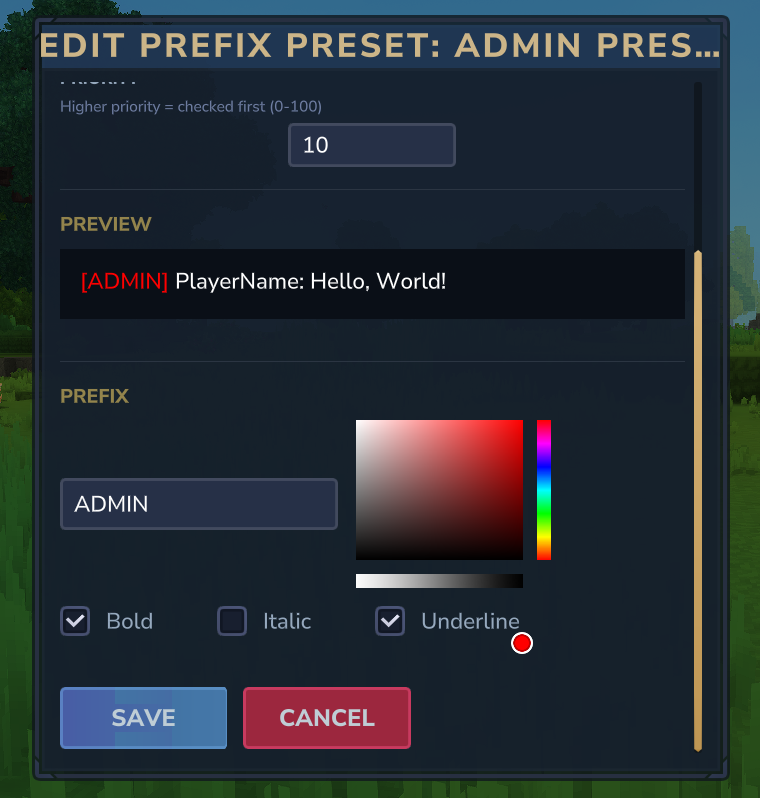
Editing an existing preset
Other Preset Editors
Prefix, Pronoun, and Message preset editors are simplified versions with only the relevant fields for that preset type.
Configuration Files
All configuration is stored in JSON files in the plugin data folder.
config.json
Main configuration file:
{
  "MaxPrefixLength": 16,
  "MaxSuffixLength": 16,
  "MaxNicknameLength": 24,
  "MaxPronounsLength": 12,
  "DefaultNameColor": "YELLOW",
  "DefaultMessageColor": "WHITE",
  "AllowGradients": true,
  "AllowRainbow": true,
  "AllowBold": true,
  "AllowItalic": true,
  "AllowUnderline": true,
  "RequirePermissionForPrefix": false,
  "RequirePermissionForSuffix": false,
  "RequirePermissionForNickname": false,
  "RequirePermissionForPronouns": false,
  "RequirePermissionForColors": false,
  "RequirePermissionForStyles": false,
  "RequirePermissionForGradient": true,
  "RequirePermissionForRainbow": true,
  "RequirePermissionForEditor": false,
  "PresetsEnabled": true,
  "AllowCustomWithPresets": true
}
Preset Files
style_presets.json- Style preset definitionsprefix_presets.json- Prefix preset definitionspronoun_presets.json- Pronoun preset definitionsmessage_presets.json- Message preset definitions
Data Files
chat_profiles.json- Player chat profile data
Permissions Reference
Admin Permissions
| Permission | Description |
|---|---|
chatcustom.admin.presets |
Manage presets via UI |
chatcustom.admin.reload |
Reload configuration |
chatcustom.admin.players |
Manage other players' profiles |
Command Permissions
These are only required if RequirePermissionFor* is enabled in config:
| Permission | Description |
|---|---|
chatcustom.prefix |
Use /prefix command |
chatcustom.suffix |
Use /suffix command |
chatcustom.nickname |
Use /nickname command |
chatcustom.pronouns |
Use /pronouns command |
chatcustom.colors |
Use color commands |
chatcustom.styles |
Use /style command |
chatcustom.gradient |
Use /gradient command |
chatcustom.rainbow |
Use /rainbow command |
Feature Permissions
| Permission | Description |
|---|---|
chatcustom.editor |
Open chat editor GUI |
chatcustom.style.bold |
Use bold formatting |
chatcustom.style.italic |
Use italic formatting |
chatcustom.style.underline |
Use underline formatting |
chatcustom.style.gradient |
Use gradient colors |
chatcustom.style.rainbow |
Use rainbow colors |
Preset Permissions
Each preset generates its own permission node:
| Format | Description |
|---|---|
chatcustom.preset.style.<id> |
Access to a style preset |
chatcustom.preset.prefix.<id> |
Access to a prefix preset |
chatcustom.preset.pronoun.<id> |
Access to a pronoun preset |
chatcustom.preset.message.<id> |
Access to a message preset |
WiFlow's PlaceholderAPI Support
ChatCustomization optionally integrates with WiFlow's PlaceholderAPI to support dynamic placeholders in your chat customization.
PlaceholderAPI support is optional. If WiFlowPlaceholderAPI is not installed, placeholders will display as-is.
Where Placeholders Work
- Prefix
- Suffix
- Nickname
- Pronouns
Usage
Include placeholders in your customization text using the {placeholder} format:
Built-in Placeholders
| Placeholder | Description |
|---|---|
{player_name} |
Player's username |
{player_world} |
Current world name |
{server_online} |
Online player count |
Expansions
WiFlowPlaceholderAPI supports expansions that add placeholders for other plugins. Install expansions to unlock more placeholders:
| Expansion | Example Placeholders |
|---|---|
| OrbisGuard | {orbisguard_region}, {orbisguard_region_name} |
| LuckPerms | {luckperms_prefix}, {luckperms_group} |
| TheEconomy | {theeconomy_balance}, {theeconomy_balance_formatted} |
| Hyfaction | {hyfaction_name}, {hyfaction_role} |
| Hyessentials | {hyessentials_homes}, {hyessentials_warps} |
Download expansions in-game with /wpapi ecloud download <expansion>
See the full list of expansions for all available placeholders.